See the work

Check what Arikano does before you trust it with anything.

Arikano does your compliance work. You approve it. This page shows what that looks like: a document it builds, a plan it shows you first, the receipt it leaves after, and the lines it will not cross.

A real document

The program you get is a file you can hand to anyone.

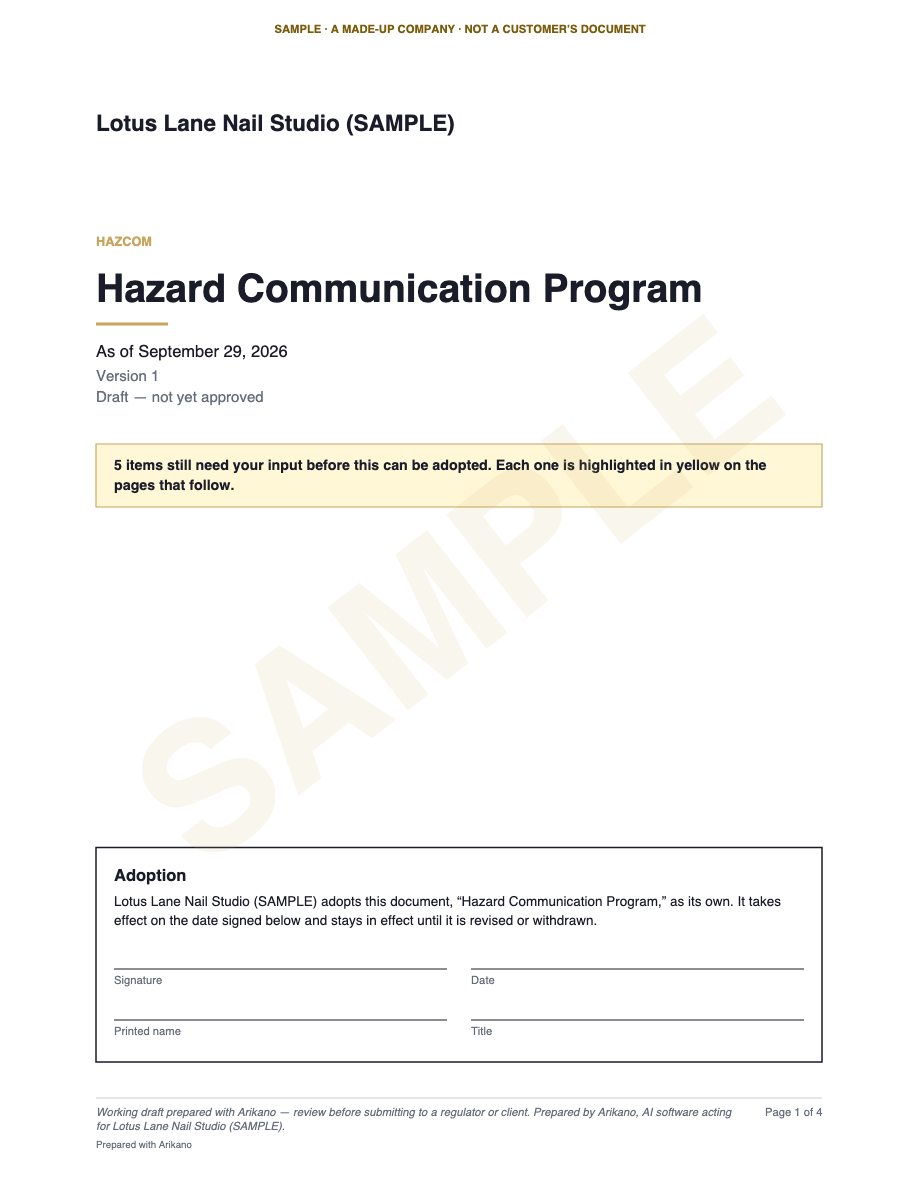
A sample Hazard Communication program for a made-up nail salon, made by the same system that makes your documents. Nothing here is a mock-up: these are pictures of the actual file.

Page 1 of the sample: the cover, with the company name, the title, “Draft — not yet approved”, a note that 5 items need the owner’s input, and an empty adoption and signature block. Opens the sample PDF.
Page 1 · the cover
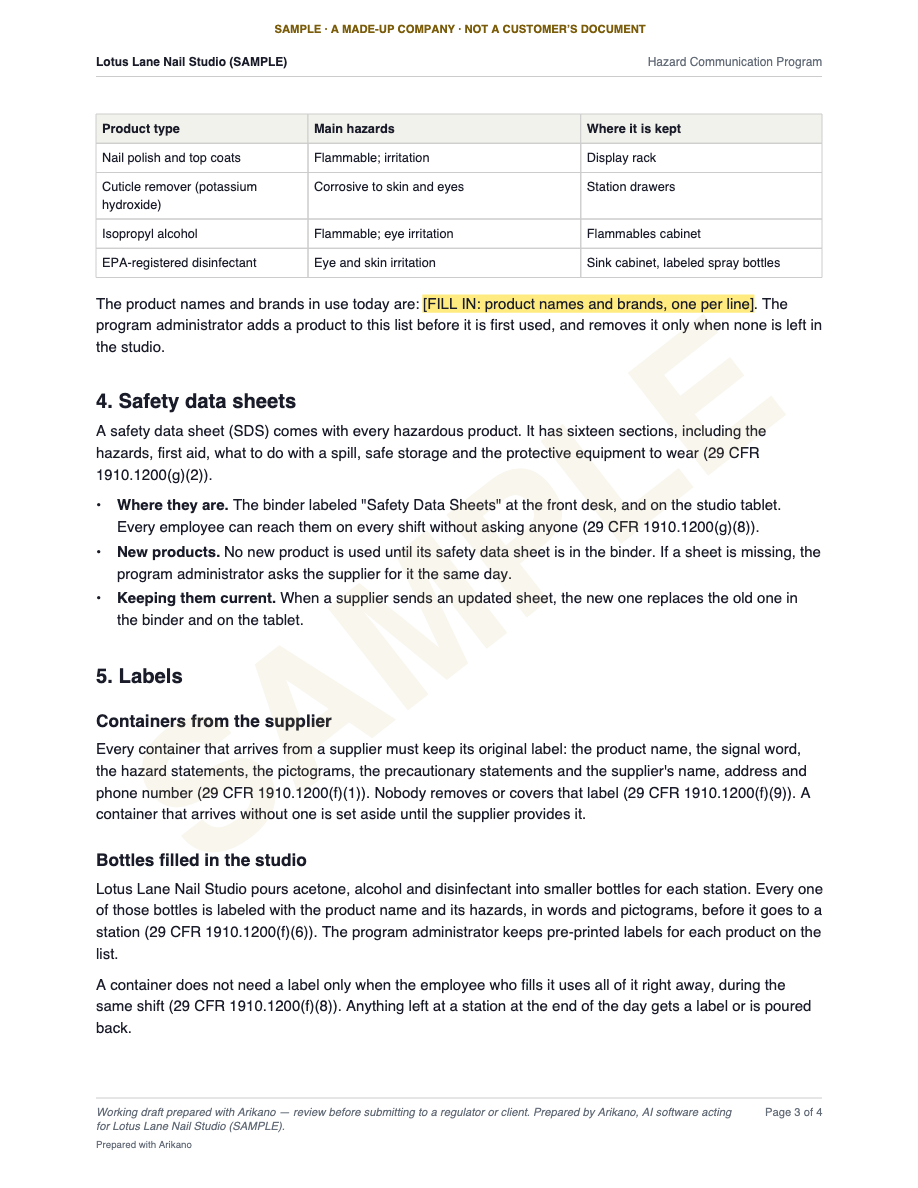
Page 3 of the sample: the chemical list, safety data sheets and labels, each paragraph citing 29 CFR 1910.1200, with one blank highlighted in yellow for the owner to fill in. Opens the sample PDF.
Page 3 · the program itself

What to look for

  • Your company’s name on the cover and at the top of every page, not a template’s.
  • The rule behind each paragraph. Every requirement names the section of the regulation it comes from.
  • The facts only you know are left blank and highlighted, and the cover counts them. Arikano does not make them up.
  • It is a draft until you adopt it. The cover has the adoption and signature block for you to sign.
  • A review line on every page, so nobody mistakes a working draft for a finished one.
Download the sample PDF

4 pages · 20 KB · stamped SAMPLE on every page. The text was written for this sample; in your workspace, Arikano drafts it from your answers and your records.

A plan before, a receipt after

You see the plan before anything starts.

Each step says who can make it happen. When the job is done, the receipt lists every record it changed, what is waiting for you, what it could not check, and the audit trail entries behind it.

Example Before: the plan
Plan · approved by Dana, 2:14 pmP-0107

Lockout/tagout update for Calder Bay Refining

Asked by Dana, Tue Sep 29, 2:12 pmDue to Calder Bay Refining Fri Oct 2

Your crews service equipment at Calder Bay Refining sites. Under you and Calder Bay Refining must tell each other your lockout procedures, so they review yours on ISNetworld. Rev 2 has no procedure for chiller #3.

NumberStepWhat it touchesAuthority
01Read the request, set the deadlineISNetworld · read, and Deadline · addOn its own
02Check Rev 2 against Program · readOn its own
03Link training records as evidence(c)(7) TrainingOn its own
04Draft the chiller #3 procedure(c)(4) ProceduresOn its own
05From your note: Baytown air compressor procedure(c)(4) ProceduresOn its own
06Draft the inspection form(c)(6) InspectionOn its own
07Build Rev 3, naming Calder Bay RefiningDocuments · draft, and (f)(2) Outside personnelOn its own
08You sign Rev 3Program recordOnly you sign
09Upload Rev 3 to ISNetworldLeaves ArikanoWith your OK
Never
  • Sign Rev 3 for you. It names you as program administrator.
  • Certify the periodic inspection. The employer does, .
  • Decide a machine is exempt from a written procedure, .
Example After: the receipt
Receipt · plan P-0107R-0418

Lockout/tagout, Rev 3 drafted

Tue Sep 29 · 2:14–2:23 pmRidgeline Mechanical

What changed6 records

  • Rev 3 drafted, PDF and WordDocuments
  • York chiller #3 procedure Program
  • Baytown air compressor from your noteProgram
  • Next inspection form Program
  • 14 training records linked Training
  • Deadline added: Fri Oct 2Calendar

Waiting for your OK2

  • Fill in and sign Rev 3Only you sign
  • Upload Rev 3 to ISNetworldLeaves Arikano

Couldn’t check1

  • ISNetworld: Calder Bay Refining’s own lockout procedure isn’t on ISNetworld, so names them but can’t quote it. Ask your Calder Bay Refining contact for it.
  • Nothing left Arikano. Sent, submitted or signed: none.
Audit trail entries 0411–0426Audit ID 3b7e a912 04cd 7f51

4 of 6 ready now · 6 of 6 once you sign
Drafts don’t count as ready. Program health 62 → 64: drafts count half until signed.

A sample job for Ridgeline Mechanical, a made-up contractor. The buttons show what each one does in your workspace.

Who decides what

Arikano does the work. You approve it.

Every step Arikano takes is marked with who can make it happen. The same four marks are on every plan, so you know before anything starts.

On its own

For a small business: “I’ll do this”

The work that changes nothing until you say so.

  • Read your records, your prequalification accounts and the rules that apply to you
  • Draft programs, forms and letters
  • Link records you already have as evidence
  • Add deadlines and reminders

Every step is written to your audit trail. A draft can be thrown away, and a link or a reminder has an Undo.

With your OK

For a small business: “Needs your OK”

Anything that changes a record or leaves Arikano.

  • Change what one of your records says
  • Send an email, a letter or a request
  • Upload or submit to ISNetworld, Avetta, Veriforce or anyone else

You see exactly what will happen first. Each OK covers one action and works once.

Only you sign

For a small business: “You sign it”

What makes a document official.

  • Adopt a program or a policy
  • Fill in the facts only you know
  • Sign as the person responsible

A new version replaces the old one only after you sign it.

Never

For a small business: “Your call, not mine”

Arikano refuses these, even when asked.

  • Sign anything for you
  • Certify a form on your company’s behalf
  • Decide that a machine or a task is exempt from a rule
  • Pay for anything
  • Make a legal decision for you

It prepares the paperwork and shows you the rule. The decision stays yours.

Security and trust

Everything we promise is written down.

We are not yet independently certified against any security framework, and we say so plainly rather than implying otherwise.

  • Terms of Service

    Arikano prepares drafts; you review and approve them. The terms say so in writing.

  • Privacy Policy

    What we collect, who else handles it, how long it is kept, and how to delete it.

  • Report a security problem

    Write to security@arikano.com. We acknowledge every report within 48 hours.

Arikano does your compliance work. You approve it.

Start with your own company: what applies to you, what is missing, and the first drafts.